One page for everything you've said you'll do. After each call you record in Granola, Claude works out what you took on, does the parts it usefully can (drafting the email you promised, digging out the doc you said you'd send) and puts it all on a private tracker page. Once a week it also adds emails and Slack messages you sent that never got a reply, with a follow-up already drafted. You tick things off, snooze them or dismiss them, and you can hand things to Claude from the page.
I keep it open all day. I have a lot of calls, and most end with a handful of small actions: a link to send, an intro to make, a point to raise with someone. I hardly use Asana, so this page is my to-do list, and my few Asana tasks show up on it too. It's how I make sure the things I say yes to in calls actually happen.
What it looks like
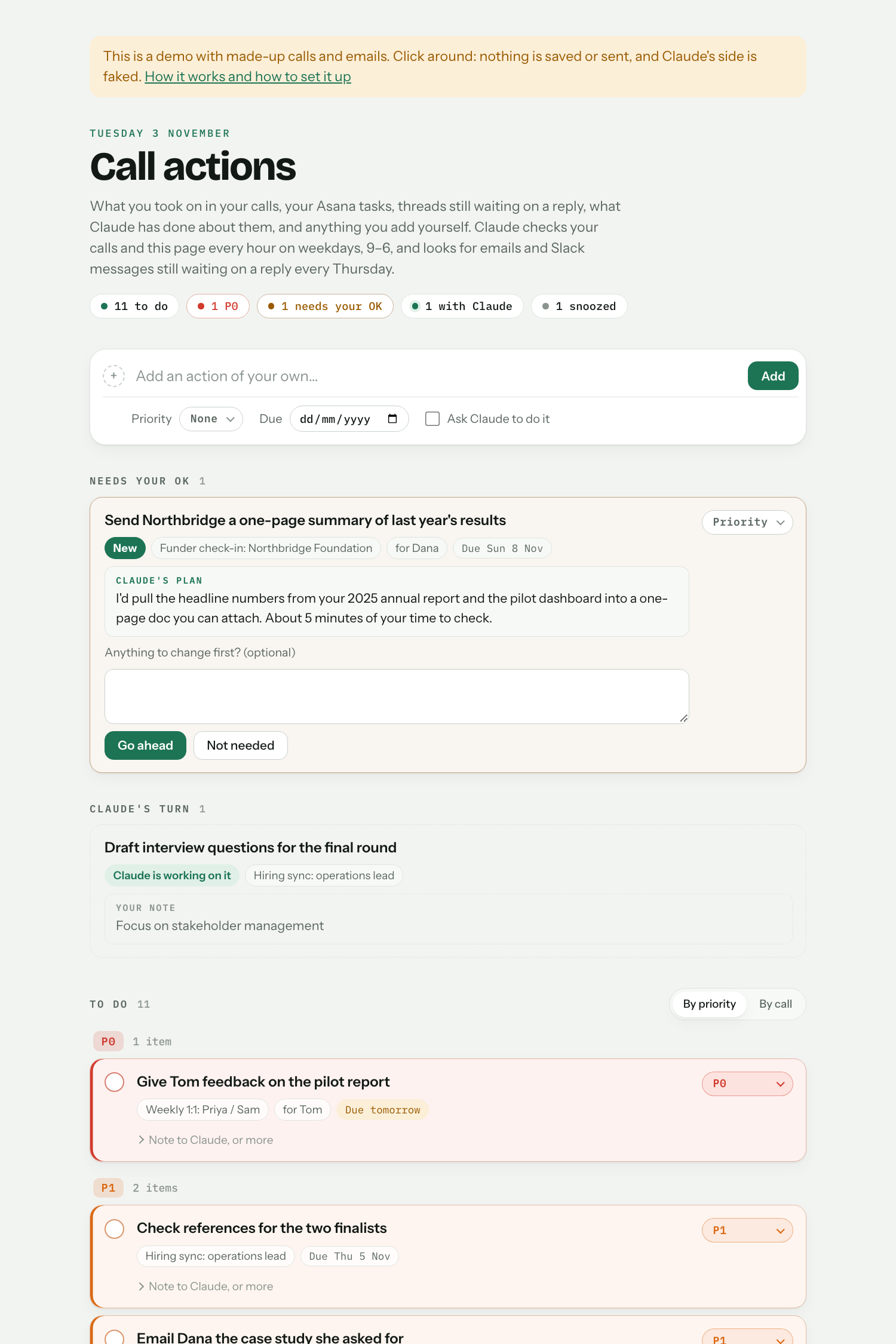
Try the live demo: it runs on made-up calls and emails, so click around. Nothing is saved or sent.
What it does
After each call (it checks every hour, or as often as you like):
- Summarises the call with the Fancy call summaries skill, which it installs if you don't have it.
- Picks out your actions: only the clear ones, where you said you'd do something or agreed to. Not what other people took on, and not "we should…". It leans towards leaving things out, because a false to-do costs you more than a miss.
- Decides, for each one, whether Claude's help would save you time:
- Drafted: Claude did its part (say, drafted the email you promised) and you check it and send it.
- Needs your OK: a bigger job. Claude says what it would do and how long your review would take, and waits for your go-ahead.
- Yours: it needs you: a decision, a conversation, feedback to someone. Claude adds a useful link if there is one.
- Adds them to the tracker, linked to the call's summary.
Once a week (Thursday afternoons, say):
5. Finds emails and Slack messages you sent more than a week ago that never got a reply, checks they weren't settled somewhere else, and adds the ones worth chasing, with a short follow-up email drafted on the thread. If they reply later, the item ticks itself off.
About once an hour, if you use Asana (optional):
6. Brings in your open Asana tasks, so the tracker is your one list. Tasks you finish in Asana tick themselves off here. If you choose, ticking one off here also completes it in Asana: the only thing it ever changes there.
On the page you can:
- tick items off, set priorities (anything due tomorrow turns top priority by itself), snooze items for a day to a month, or drop or dismiss them with a reason;
- add your own items, and tick "Ask Claude to do it";
- leave Claude a note on any item ("make the draft shorter");
- tell Claude how to work in the "Tell Claude" box ("don't draft emails to my manager"). It applies that from then on, and learns from your reasons for dropping things.
Choices you'll be asked about at setup
| Choice | Options | What I use |
|---|---|---|
| What it covers | Calls and follow-ups, calls only, or follow-ups only (no Granola needed) | Both |
| How often it checks for calls | Every hour, every 10 minutes, or twice a day, on weekdays | Every 10 minutes, 9–6 |
| What Claude may do with actions | Draft emails, Slack messages and short docs, or only list the actions | Draft |
| How email drafts end | Your usual sign-off and name, or nothing (your signature covers it); optionally "Co-written with Claude" | Nothing, plus "Co-written with Claude" |
| Follow-up check | Which day and time; email only or email and Slack; draft follow-ups or not | Thursdays from 14:00, both, drafts on |
| Agenda points in 1:1 docs | "I'll raise that with Priya" becomes a line in your 1:1 doc with Priya, instead of a drafted message | On |
| Calendar holds | When you ask for time to be blocked, Claude adds a hold to your own calendar, never with guests | On |
| Monday digest | A Slack message to yourself on Monday morning listing what's open | I use a Slack bot that also nudges me when I haven't opened the page for a day; this is the simpler version |
| Asana tasks | Leave them out, show them on the tracker, or show them and tick them off in Asana when you tick them here | Show them, and tick them off in Asana too |
You can change any of these later, or anything else about how it works, by asking Claude.
Set it up
- If you haven't used Claude Code before, follow Getting started first (about 10 minutes, once).
- In Claude, open Settings → Connectors and connect Gmail, plus Granola and Google Drive if you want it to cover calls. Slack, Google Calendar, Google Docs and Asana are optional.
- Start a new session in Claude Code and paste this in:
Set up "call-actions" from Aidan's Claude toolkit. Fetch https://raw.githubusercontent.com/Aidan-Alexander/claude-toolkit/main/call-actions/SETUP.md exactly as written (e.g. with curl) and follow it.
Claude asks you the questions above, makes your private tracker page, sets up the Fancy call summaries skill if you need it, and schedules the checks. It then offers a first run, so your page starts with something on it.
Using it
- The page: pin it to your claude.ai sidebar and keep it open. It updates live.
- Run it now: say "check my calls" in Claude Code.
- Pause it: in the Claude app's sidebar, open Scheduled → Call actions and switch it off.
Good to know
- It never sends anything. Emails become Gmail drafts and Slack messages become Slack drafts: you do the sending. It doesn't edit your existing files either, apart from the optional agenda points, calendar holds and ticking off Asana tasks.
- The page is private. Only you can open it, and only you can ask Claude to do things through it.
- It runs while the Claude desktop app is open. If your laptop was shut, it catches up when you next open the app.
- Usage: each check is a short Claude session, and each call's summary and actions take more. Checking hourly is the lighter choice.
- Accuracy: it's built to under-claim. When it gets something wrong, drop the item with a reason, or say so in the "Tell Claude" box.
- No special setup: no Python, no API keys, no Slack bots. Claude does all of the setting up.
Changes
- 2026-11-03: First version in the toolkit, with the weekly follow-up check, snoozing and optional Asana tasks.