Aidan's Claude toolkit

My open-source systems for working with Claude

Aidan's Claude toolkit

No time to look at this yourself? Ask your Claude to check this site and recommend tools from it that might be a good fit for your workflow.

I'm Aidan Alexander, COO at Ambitious Impact (AIM). This is a bunch of systems I've set up so that Claude helps me work better and more efficiently. My Claude has written it up so colleagues and anyone else in the AIM community can borrow the useful bits.

Some systems/tools I've packaged up for you to install: You paste one line into Claude Code and it does the rest, asking you a few questions as it goes. No coding needed.

Most of these started as a one-line request to Claude Code, like "every Thursday, find emails I sent that got no reply".

I also list other skills I have installed that I haven't packaged up, in case it gives you ideas for skills on your Claude.

Packaged for you to install – from my Claude to yours 💌

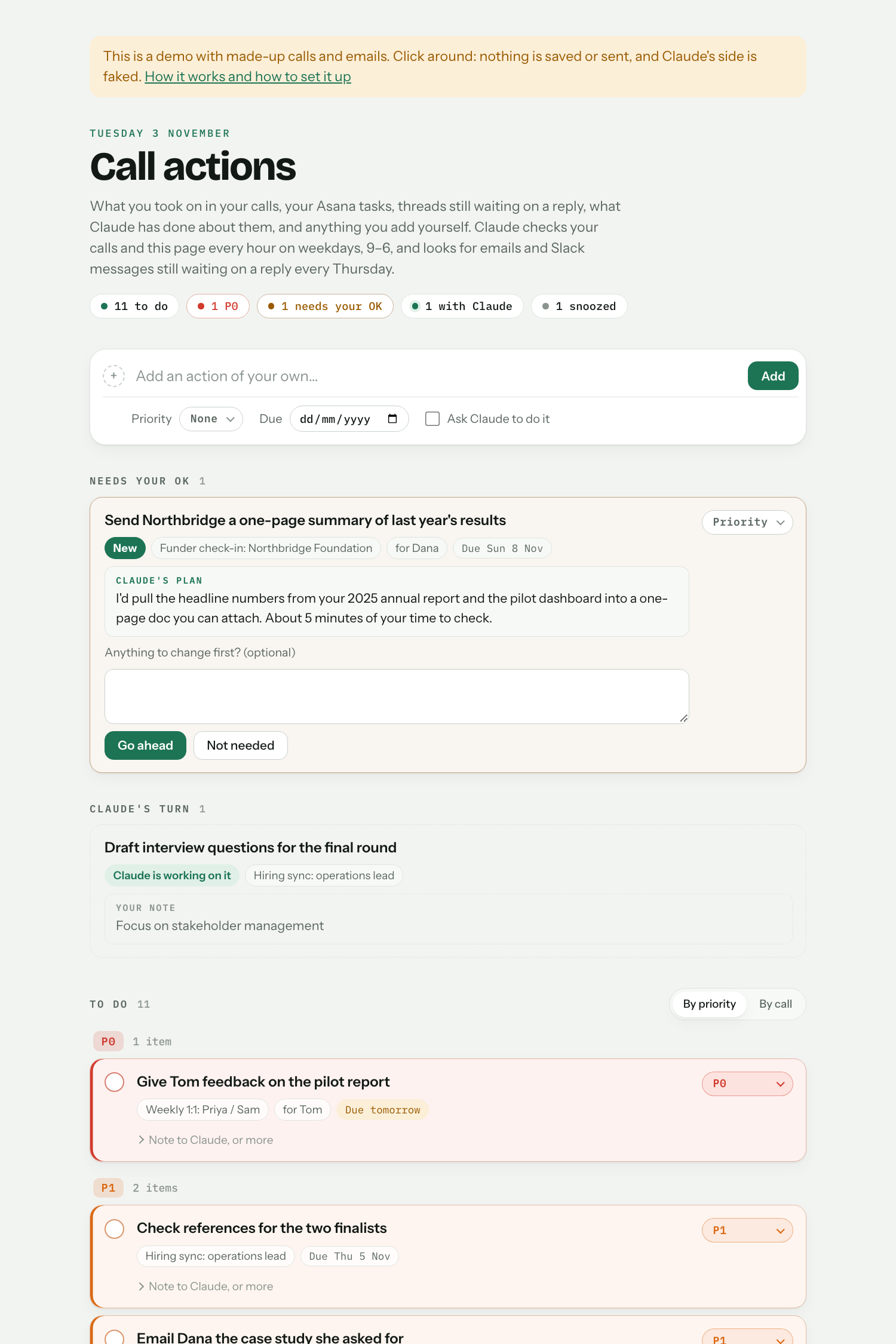
Automatic actions from calls

After each call, it adds what you said you'd do to a to-do list, and does them for you when it can (as drafts for you to check). Once a week it adds emails and Slack messages that never got a reply, and it can bring in your Asana tasks too. As you use it, it collects your feedback on what counts as an action it should add, and when and how it can take actions for you, so it keeps getting better.

Why it's usefulI have lots of calls, each with several small actions I need to keep track of and act on, and busy inboxes where it's easy to drop a ball. This catches them all in one place, and Claude does the easy ones.

Connectors you'll needGmail; Granola and Google Drive for calls

Set it up: paste this into Claude Code

Set up "call-actions" from Aidan's Claude toolkit. Fetch https://raw.githubusercontent.com/Aidan-Alexander/claude-toolkit/main/call-actions/SETUP.md exactly as written (e.g. with curl) and follow it.
Fancy call summaries

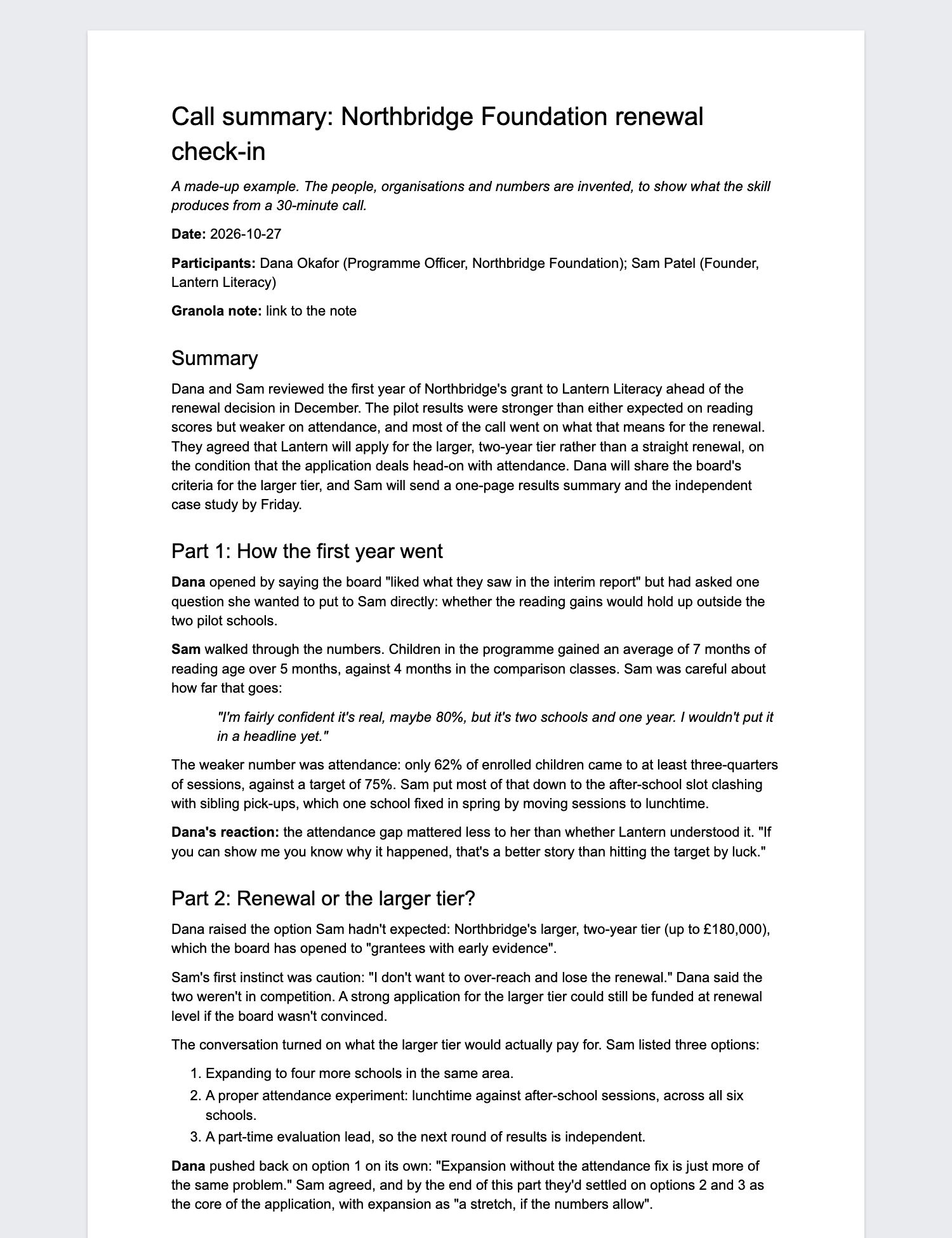
Checks regularly for new calls you've recorded in Granola (or does one when you ask), turns each into a detailed, chronological summary in a Google Doc, and files it in a folder on your Drive. It can also add a link to each summary in your 1:1 doc with that person.

Why it's usefulGranola's own notes are a quick list of bullets. These tell the story of the call: the reasoning behind decisions, who thought what, the exact words for commitments, and the open questions, so I can pick up a thread weeks later. They also make it far cheaper to miss a meeting and just read the summary, because it gives a far more detailed narrative of the conversation. So I can skip meetings I need to follow but not contribute to: someone shares the Granola note with me, or sends me the transcript to paste into Claude, and the skill summarises it.

Connectors you'll needGranola, Google Drive

Set it up: paste this into Claude Code

Set up "summarise-granola" from Aidan's Claude toolkit. Fetch https://raw.githubusercontent.com/Aidan-Alexander/claude-toolkit/main/summarise-granola/SETUP.md exactly as written (e.g. with curl) and follow it.

MailSmüsh

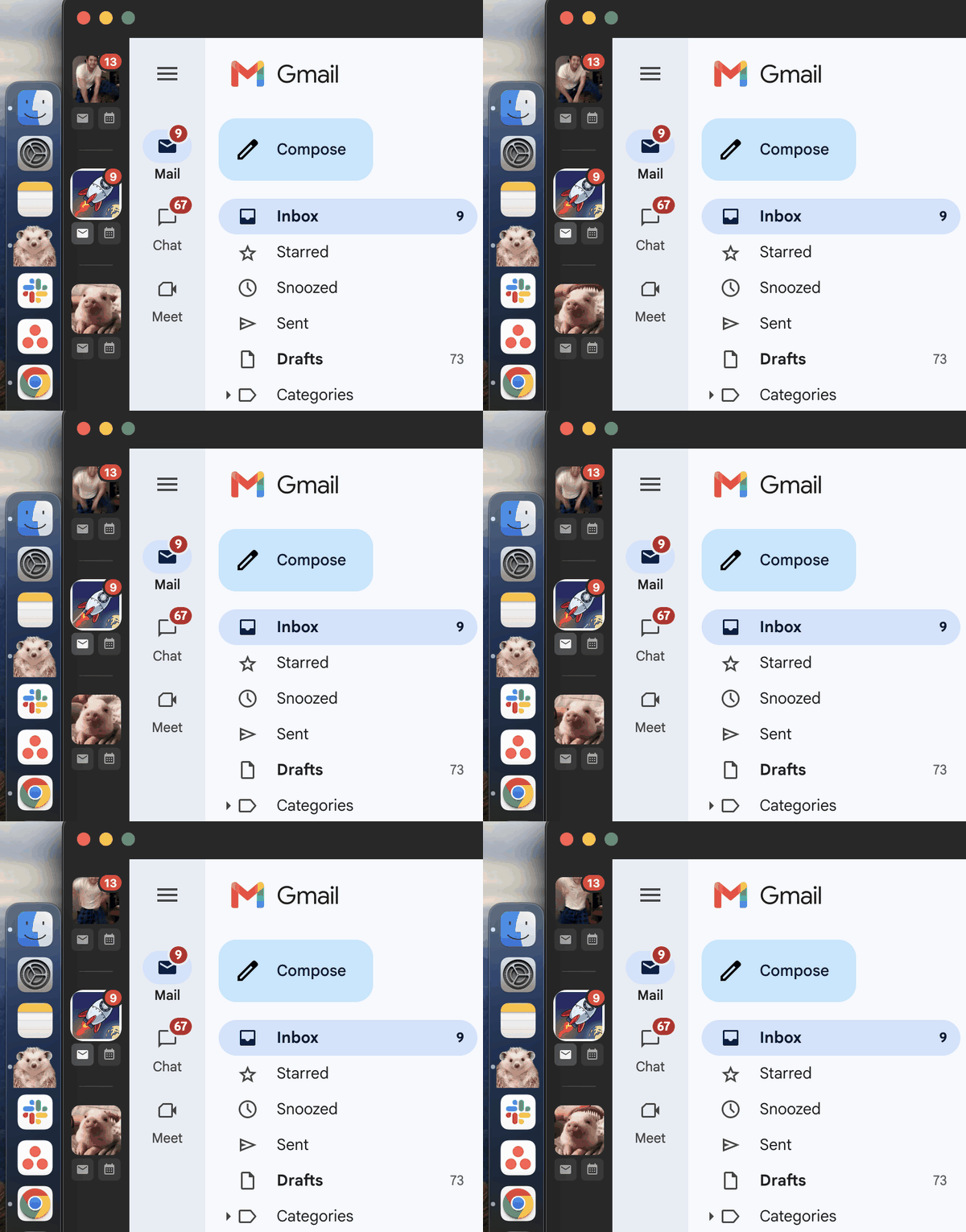
A Mac app that keeps all your Gmail inboxes and Google Calendars in one window, outside your browser. Each account gets its own icon (any picture or gif you like) with its unread count. Mac only.

Why it's usefulI have three inboxes and calendars: personal, AIM and FarmKind. This keeps them all in one place, as a desktop app outside Chrome, so email isn't one tab among dozens.

Connectors you'll needNone

Set it up: paste this into Claude Code

Set up MailSmüsh for me. Fetch https://raw.githubusercontent.com/Aidan-Alexander/mailsmush/main/SETUP.md exactly as written (e.g. with curl) and follow it.

Work hours enforcer

Ends your workday at a set time, and puts your laptop to sleep at bedtime, unless you click to skip. Mac only.

Why it's usefulIt's there to help me with my work-life balance. Firstly, it automatically closes my computer at a certain time to push me to leave the office. Secondly, it shuts down work apps so when I open my computer later I'm less likely to see work tabs and get sucked back in.

Connectors you'll needNone

Set it up: paste this into Claude Code

Set up "work-hours" from Aidan's Claude toolkit. Fetch https://raw.githubusercontent.com/Aidan-Alexander/claude-toolkit/main/work-hours/SETUP.md exactly as written (e.g. with curl) and follow it.

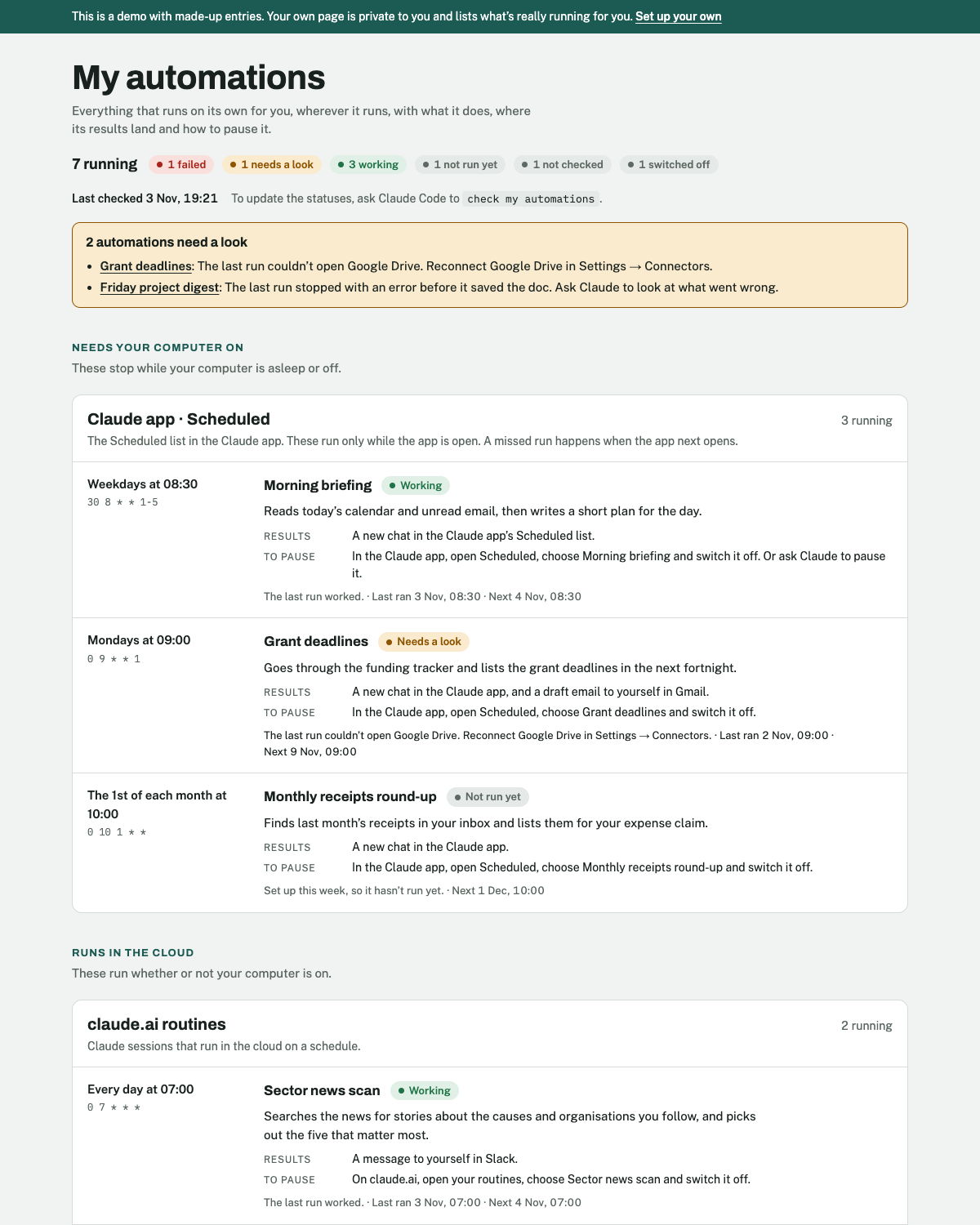
Automations page

One page listing everything that runs on a schedule for you, and whether each one is working. Claude keeps it up to date.

Why it's usefulAutomations are easy to set up and easy to forget, and a broken one fails quietly. This is one place to see what's running, whether it's working, and how to pause it.

Connectors you'll needNone

Set it up: paste this into Claude Code

Set up "automations-page" from Aidan's Claude toolkit. Fetch https://raw.githubusercontent.com/Aidan-Alexander/claude-toolkit/main/automations-page/SETUP.md exactly as written (e.g. with curl) and follow it.

You set all five up in Claude Code: the Code tab of the Claude desktop app, not the usual chat. If you haven't used it before, Getting started covers the one-off setup, which takes about 10 minutes.

Why Claude Code? It does everything Chat and Cowork do, and other things besides. Apart from Projects, there's basically no reason to use Chat and Cowork, at least for me. When you first use it, switch it to Auto mode, so it isn't constantly asking your permission for tiny things.

Each tool lists the connectors it needs. You connect them once in Claude, under Settings → Connectors, and each tool's setup checks they're there and tells you what to do if one's missing.

None of them ever send anything for you. They write drafts and documents, and you do the sending.

PSA – you can change your Claude thinking words!

While Claude Code works, it shows a word like "Pondering…" or "Combobulating…". You can swap these for your own. For example, I've added about 30, including Cuddling… Faffing… Nematoding… Fibremaxxing… and Going through puberty…

Paste this into Claude Code:

I want to change the words Claude Code shows while it's working ("Thinking…", "Pondering…" and so on). They're the "spinnerVerbs" setting in ~/.claude/settings.json. Show me the current list as a numbered list: if I haven't changed it yet, find Claude Code's built-in list in its installed files or its documentation. Then ask me which to remove and what to add. Save the result as "spinnerVerbs" with "mode": "replace" and my full list in "verbs", keep every other setting as it is, and show me the final list.

Other skills and automations I use

Keeping track of AIM's portfolio of charities

My Claude setup

Writing, docs and slides

The AIM website

Scheduling

Life

I keep track of everything that runs on its own on my automations page (above).

Things I've built with Claude