Say "summarise my last call" and Claude turns the call's Granola transcript into a detailed summary in a new Google Doc: what was discussed in the order it happened, who thought what and why, what was decided, and who's doing what next. It works on calls other people recorded too: a Granola note they share with you, or a transcript they send you to paste into Claude.
I use it after nearly every call, and now run it automatically with Automatic actions from calls.
Why not just use Granola's notes?
Granola's own notes are a quick list of bullets. These summaries tell the story of the call instead: the reasoning behind decisions, changes of mind, the exact words for commitments and hedges ("probably", "70% sure"), plus open questions and key quotes. They're written so you can re-live a call weeks later, or pick up a thread you'd half forgotten. A meaty 45-minute call gets 2,000–4,000 words; a quick check-in gets far fewer. If you'd rather have a one-pager, you can choose that at setup.
They also make it far cheaper to miss a meeting and just read the summary, because they give a far more detailed narrative of the conversation than notes do. So you can skip meetings you need to follow but not contribute to, and have someone share the transcript with you to summarise: either by sharing the Granola note with you in Granola, or by sending you the transcript to paste into Claude.
What it looks like
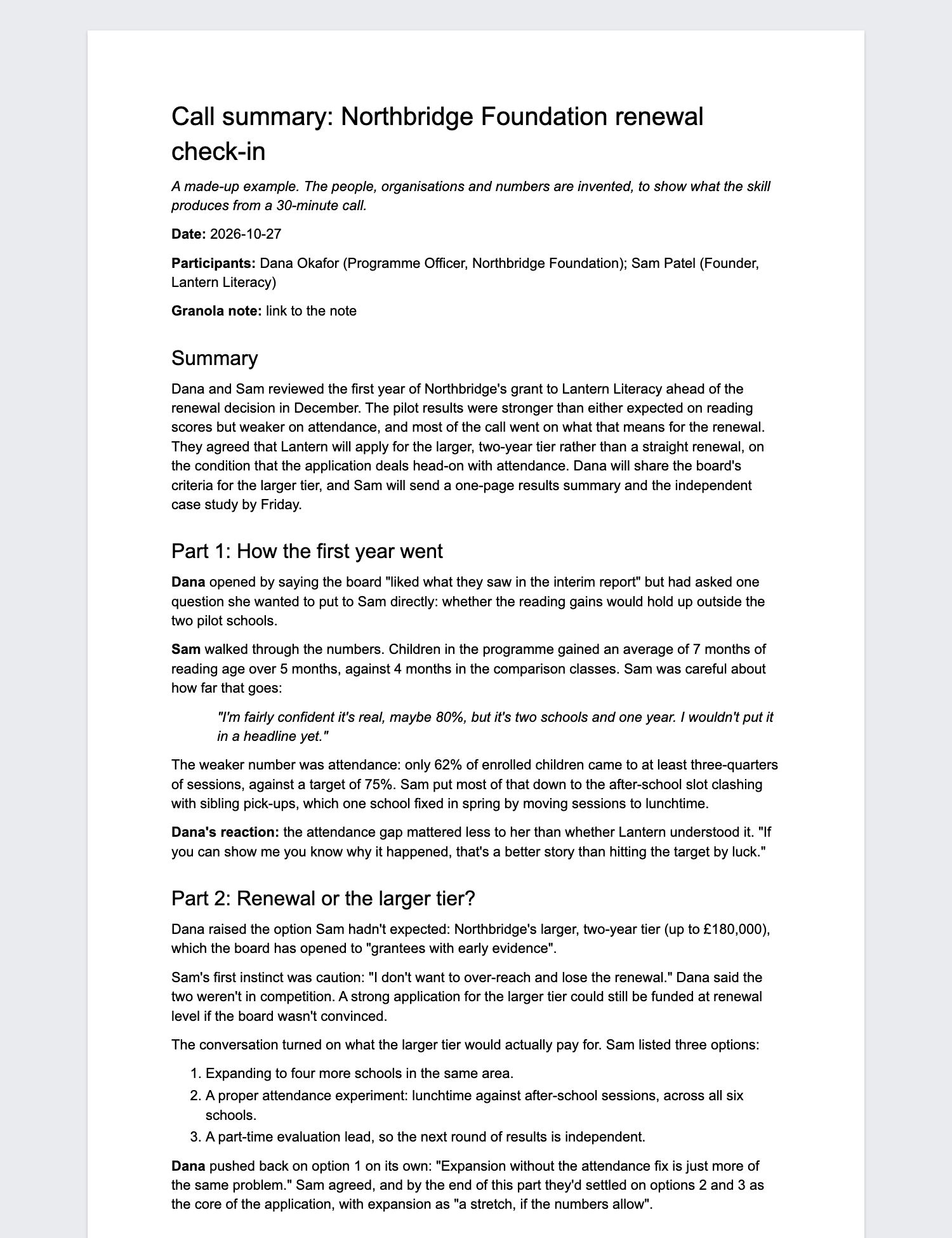
That's a made-up call. Read the whole example summary.
What it does
- Picks the call: if you like, it checks for new calls every hour on weekdays and summarises each one by itself. Or it does the one you name when you ask, or the one that just ended.
- Reads the whole transcript from Granola, however long.
- Works out who said what. Granola's speaker labels are often wrong, especially when a room shares one laptop, so it checks them against what was said and marks anything it's unsure of with "(?)".
- Writes the summary and saves it as a Google Doc in a folder on your Drive ("Call summaries", unless you choose another).
- Optionally adds a tidied transcript to the end of the doc, and a dated link to the summary at the top of your 1:1 doc with that person.
- Gives you the link. It never sends or shares anything: the doc is private until you share it.
Choices you'll be asked about at setup
| Choice | Options | What I use |
|---|---|---|
| Length | Detailed narrative, or a one-page summary | Detailed |
| Tidied transcript at the end | Always, only when you ask, or never | Always |
| Spelling | British or American English | British |
| Where docs go | A "Call summaries" folder, or the top of My Drive | The folder |
| 1:1 docs | Add a dated link to each summary at the top of your running doc with that person | Yes, for my direct reports |
| Automatic | Check for new calls every hour on weekdays and summarise them by itself, or only when you ask | Every call, automatically (through Automatic actions from calls) |
You can change any of these later, or anything else about how it works, by asking Claude ("make my call summaries shorter").
Set it up
- If you haven't used Claude Code before, follow Getting started first (about 10 minutes, once).
- In Claude, open Settings → Connectors and connect Granola and Google Drive. For the 1:1 doc links, connect Google Docs too.
- Start a new session in Claude Code and paste this in:
Set up "summarise-granola" from Aidan's Claude toolkit. Fetch https://raw.githubusercontent.com/Aidan-Alexander/claude-toolkit/main/summarise-granola/SETUP.md exactly as written (e.g. with curl) and follow it.
Claude downloads the skill, asks you the questions above, and offers to summarise your last call as a test.
Using it
In any Claude Code session:
- "summarise my last call"
- "summarise my call with Priya on Tuesday"
- "summarise Sam's note of the board meeting", for a Granola note someone shared with you
- "summarise this transcript", with a transcript someone sent you pasted in
/summarise-granola
If you turned on automatic, you don't need to ask: each call is summarised about an hour after it ends, while the Claude app is open.
A summary takes a few minutes. You can keep working in another session while it runs.
Good to know
- Accuracy: skim before you rely on it. The usual weak spot is who-said-what in in-person meetings recorded on one laptop, which it flags.
- Privacy: the transcript is read by Claude under your account. The doc it creates is in your Drive and private to you.
- Usage: a detailed summary of an hour-long call uses a fair amount of your Claude plan's usage, roughly what a long chat would.
- No special setup: no Python, no command-line tools, no API keys. It works on Mac and Windows, wherever Claude Code and Granola do.
- Updating: paste the setup line again. Your settings, and any changes you've asked for, are kept: Claude records those in your settings file. If anyone has edited the skill's own files, Claude shows you what's different and carries it across first.
- Removing: ask Claude Code to "remove the summarise-granola skill".
Credits
This grew out of HartreeWorks' summarise-call skill. My own, more technical version (Python scripts, which need a Mac) is at Aidan-Alexander/summarise-granola. You don't need it: this version does the same job with connectors alone.
Changes
- 2026-11-04: Spells out that it summarises calls other people recorded: a Granola note they share with you, or a transcript you paste in.
- 2026-11-03: First version in the toolkit: connectors only, with setup questions, and an optional automatic mode.